
Sprout - AI Job Search
MagnifexBusiness
4.4660.00 Reviews
- Version
- 2.0.13
- Installs
- 100.00K
- Age Rating
- Everyone
Screenshots

Our Review of Sprout - AI Job Search
 Analysis by Appyee
When I’m looking for work, the hardest part isn’t always finding a listing; it’s keeping the search focused once dozens of possibilities start competing for attention. Sprout - AI Job Search is built around narrowing that hunt with a profile, preferences and AI-assisted recommendations. I’d treat it as a way to organize discovery and keep opportunities moving, rather than as a promise that a job will appear on its own. That distinction matters: a useful match still needs a careful read, a tailored application and follow-through from me.
That makes the app most appealing when I’m exploring a new role or trying to bring some order to an active search. It is a free business app from Magnifex, rated for Everyone, and its store presence shows a 4.5 average from around 41,000 ratings, with over 100,000 installs. I see those figures as context, not proof that every recommendation will fit my situation. The practical question is whether its workflow helps me move from broad interest to a considered application without losing track of what I actually want.
From a broad search to a more deliberate application
I use this section to explain how I’d turn an open-ended job hunt into a search with clearer boundaries, without mistaking a tidy feed for a complete picture of the market. The next part follows the practical steps from setting preferences to deciding which leads deserve my time, with attention to the small choices that make recommendations more useful.
Set the boundaries before browsing
Signing up was a breeze. You can either create an account from scratch or connect using your LinkedIn profile, which I found super handy. Once you’re in, the app prompts you to fill in your job preferences. I appreciated how detailed this section was, allowing me to tailor my search specifically to what I’m interested in. From job titles and industries to salary expectations and preferred locations, Sprout covers all the bases.
I’d spend a little time getting those choices right instead of rushing straight into the listings. A search for a job title can be too narrow if my experience transfers across industries, while a loose location or salary preference can make recommendations feel scattered. A useful approach is to set a realistic first pass, then adjust one preference at a time when the results feel off. That makes it easier to tell whether the issue is the job title, the location or another boundary, rather than changing everything and losing the thread.
For example, if I were shifting from customer support into customer success, I would include the roles I’m ready to pursue while keeping the industries and location choices grounded in what I would genuinely accept. I wouldn’t treat the profile as a one-time form. It is the steering wheel for the suggestions, so a brief review after a change in priorities can make the rest of the search more useful.
Read recommendations as leads, not verdicts
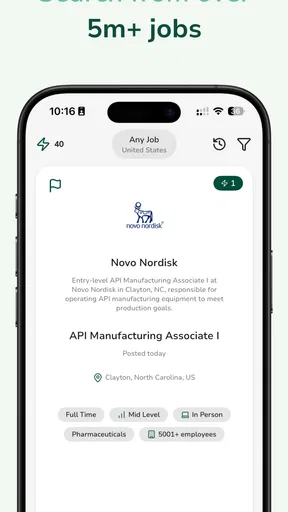
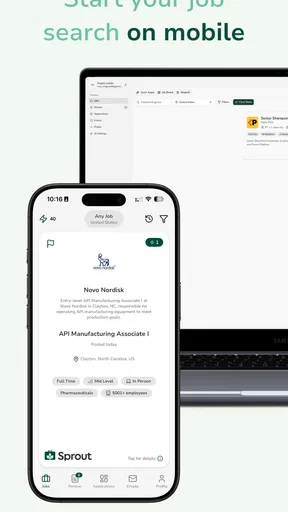
This is where things get interesting. The app’s AI-driven engine is like having a personal recruiter in your pocket. It analyzes your profile and preferences to suggest job listings that match your criteria. It’s almost like magic how accurate these suggestions were! Plus, the AI learns from your interactions, so the more you use it, the better it gets at finding the perfect job match for you.
I’d still check each listing against the details that matter to me: whether the responsibilities fit my experience, whether the level is sensible, and whether the role’s location and pay expectations line up with my own. A recommendation can look close because of its title but ask for a different kind of work in practice. That quick human check is important; AI can help surface possibilities, but it cannot decide whether I want the day-to-day job described.
One useful habit is to notice patterns in the suggestions rather than judging the whole system from a single result. If several listings lean toward a role I don’t want, I’d revisit the profile and preferences before assuming that every recommendation will be irrelevant. I’d also avoid changing several settings at once. Small adjustments give me a clearer sense of what improves the feed and keep the search from becoming a guessing game.
Build a manageable discovery routine
Scrolling through job listings is as addictive as scrolling through social media feeds. The app provides a continuous stream of opportunities, and you can save interesting ones for later consideration. What’s even cooler is the alert feature. Set up alerts for specific job criteria, and Sprout will notify you as soon as a matching job is posted. It’s like having a personal assistant who never sleeps!
For a real-world routine, I’d check new matches at a set point in the day rather than interrupting every task whenever an alert arrives. I can save a listing that looks promising, then return when I have time to read the responsibilities and compare it with my goals. This separates quick discovery from the slower decision about whether I should apply, which helps prevent a stream of notifications from turning into a stream of half-finished applications.
Saved roles are most useful when I attach a decision to each revisit: apply, investigate further, or pass. Even without turning the app into a full job-search spreadsheet, that simple mental sorting helps me avoid reopening the same listings without progress. If I’m searching in more than one direction, I’d keep the criteria for each direction distinct enough that alerts remain meaningful, rather than letting very different roles blend into one noisy feed.
Move from a promising listing to an application
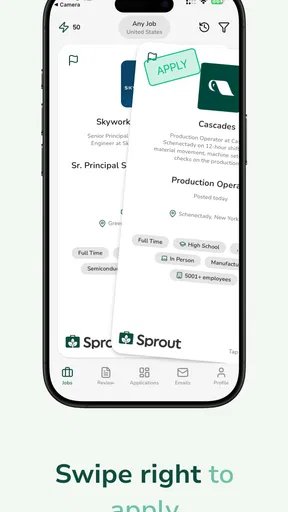
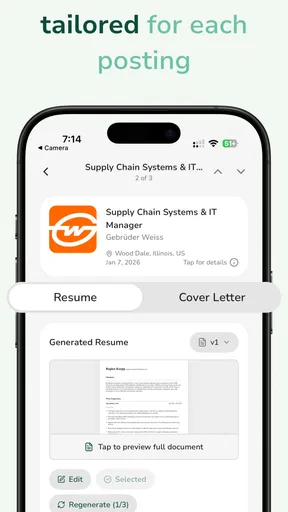
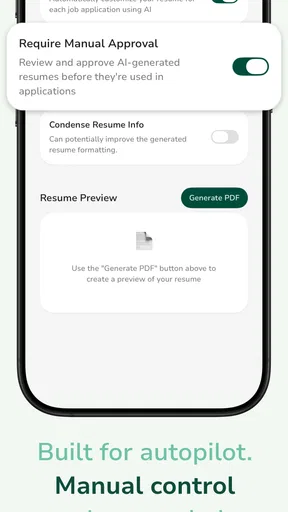
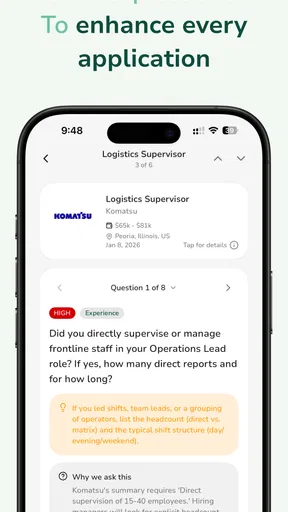
Applying for jobs through Sprout is seamless. With a couple of taps, you can send your resume and cover letter. The app also offers tips on how to enhance your application, which I found incredibly useful. It’s not just about getting the job, but making sure your application stands out, and Sprout helps you do just that.
The speed is helpful, but I wouldn’t let a quick submission become an unedited one. Before sending anything, I’d check that the resume reflects the role’s priorities and that the cover letter speaks to this particular opportunity rather than repeating a general pitch. The app’s tips can help me think about presentation, but my own examples and accurate details still need to do the convincing.
A practical handoff is to use Sprout to discover and begin an application, then keep a separate record of the role, the date I applied and any next step I owe myself. That might be a reminder to prepare for an interview or to follow up if appropriate. This extra step matters because a smooth in-app submission does not by itself give me a complete picture of every application I’ve sent or what I should do next.
Use networking as a separate route
Another feature that caught my eye was the networking section. It connects you with industry professionals and potential mentors. You can join forums, engage in discussions, and even set up informational interviews. It’s a fantastic way to get your foot in the door and learn from those already in the field.
I’d use this part when a listing raises questions that a job description cannot answer, or when I’m learning what a role looks like in practice. A thoughtful question in a discussion or an informational conversation can help me understand the work before I commit to an application. I would approach these contacts as people to learn from, not as a shortcut to a referral; respectful, specific outreach is more useful than asking a stranger to solve my job search.
This also creates a handoff beyond the app. A conversation may point me toward skills to strengthen or a different title to search, and I can then return to my preferences and refine the next round of discovery. That cycle—browse, learn, adjust—is more valuable than treating networking and listings as unrelated sections.
Where the workflow can stall
While the app is pretty stellar, there are a couple of areas where it could improve. Sometimes the AI suggestions can get a bit repetitive if you’re not updating your preferences frequently. Also, the app could benefit from more integration options with other job platforms to widen the pool of job listings.
That repetition is a real reason to check the settings rather than passively waiting for the recommendations to fix themselves. If the feed keeps circling the same kind of role, I’d reassess what I’ve told the app and decide whether I genuinely want broader results. But if I’ve already set clear preferences and still need a much wider view across job boards, a general job-search site may be a better companion. Sprout’s focused discovery is not a substitute for checking other sources when coverage is my priority.
There is also a trade-off between convenience and control. A continuous feed and alerts can make it easier to notice openings, but they can also encourage reactive browsing. I’d turn the experience into a routine that leaves room for careful reading and application preparation. People who prefer to search manually across several platforms, compare employer pages themselves or manage every detail in one personal tracker may find that approach gives them more control.
Who will get the most from it
I think Sprout is best for someone who has at least a rough idea of the roles they want and would benefit from recommendations, saved listings and reminders to keep looking. It can also suit a person testing a career direction, provided they treat matches as prompts for research rather than as a definitive ranking of what they should do. The networking area adds another path for someone who wants to learn about a field while searching.
It is less suited to a person who needs exhaustive coverage from many job platforms in one place, or who wants every part of an application history handled as a detailed project-management system. If I’m applying for highly specialized positions, I’d use the app alongside direct employer searches and professional contacts, not rely on one stream of suggestions. Likewise, someone who dislikes AI-based recommendations may prefer a conventional search interface where each query is entirely manual.
The app is free to start, with in-app purchases ranging from $4.99 to $124.99 per item. I’d look at any paid option in light of a specific need before spending: does it address a real gap in my search, or am I simply hoping that paying will make the results better? The current version is 2.0.6 and requires Android 8.0 or later, so I’d check device compatibility before planning to use it on an older phone.
What I would expect from a week of use
In an ordinary week, I’d begin by setting the roles and locations I’m genuinely open to, then check the recommendations during a planned search session. I’d save only listings that pass a quick first check, and revisit those with enough time to compare their duties with my experience. If the same mismatch appears repeatedly, I’d adjust a preference and observe what changes instead of making several edits at once.
For roles worth pursuing, I’d tailor the resume and cover letter, use Sprout’s application guidance as a prompt to review them, and keep my own note of what I sent. If a role is unfamiliar, I’d use the networking section to learn more before deciding whether to apply. This workflow makes the app one useful stage in a broader search: it can help me notice and organize opportunities, while the quality of my choices and applications remains my responsibility.
That distinction also answers the question of whether it can replace a traditional job board. I wouldn’t use it as my only source if I needed the widest possible listing pool, and I wouldn’t expect recommendations to remove the work of checking requirements or preparing materials. I’d use it when a guided feed and preference-based discovery are more helpful than starting every search from scratch, then cross-check important roles elsewhere when coverage or detail matters more.
My overall take
Overall, Sprout - AI Job Search is a fantastic tool for anyone serious about finding their next job. Its AI capabilities truly set it apart from the crowd, and the user-friendly design makes it accessible to everyone. Whether you're actively searching or just exploring options, this app is worth checking out.
So, why not give Sprout a try? You never know where your next opportunity might sprout from!
Verdict
Strengths of Sprout - AI Job Search
- Intuitive interface simplifies job search.
- AI recommendations tailored to your profile.
- Real-time job alerts for quick applications.
- Easy resume upload and customization.
- Wide range of industries covered.
Limitations of Sprout - AI Job Search
- Limited offline functionality.
- Occasional irrelevant job matches.
- Subscription needed for premium features.
- In-app ads can be distracting.
- Location-based search needs improvement.
Similar Picks in This Category
View All
LinkedIn: Community & Network
LinkedIn3.8

Zoom Workplace
zoom.com4.1

Microsoft Teams
Microsoft Corporation4.6

Meta Business Suite
Meta Platforms, Inc.4.6

Webex Meetings
Cisco Systems, Inc.4.5

TeamViewer Remote Control
TeamViewer4.4
Frequently Asked Questions
What is Sprout - AI Job Search and how does it work?
Sprout - AI Job Search is an innovative app designed to streamline your job hunting process using AI technology. It analyzes your resume and preferences to match you with suitable job openings. With its intuitive interface, you can apply for jobs directly through the app and receive personalized job alerts.
Is Sprout - AI Job Search available for both Android and iOS?
Yes, Sprout - AI Job Search is available for download on both Android and iOS platforms. You can find it on the Google Play Store for Android devices and the Apple App Store for iOS. This ensures accessibility to a wide range of users, regardless of their preferred device.
Are there any costs associated with using Sprout - AI Job Search?
Sprout - AI Job Search offers a basic version that is free to use, providing essential features like job matching and alerts. However, for advanced features such as resume optimization and priority application status, there is a premium subscription option available. This allows users to enhance their job search experience.
How secure is my personal information on Sprout - AI Job Search?
Sprout - AI Job Search prioritizes user privacy and employs robust security measures to protect your personal information. Data encryption and secure servers are used to ensure that your personal details, including your resume and job search history, are kept confidential and safe from unauthorized access.
Can I customize job alerts on Sprout - AI Job Search?
Yes, Sprout - AI Job Search allows you to customize job alerts based on your preferences. You can set parameters such as location, industry, and job type to ensure you receive relevant notifications. This feature helps streamline your job search by keeping you informed of opportunities that match your criteria.
